FanHub Plus
I built a multi-fandom web app for anime, games, and movies with an ASP.NET Core backend, Angular frontend, and Three.js visuals.
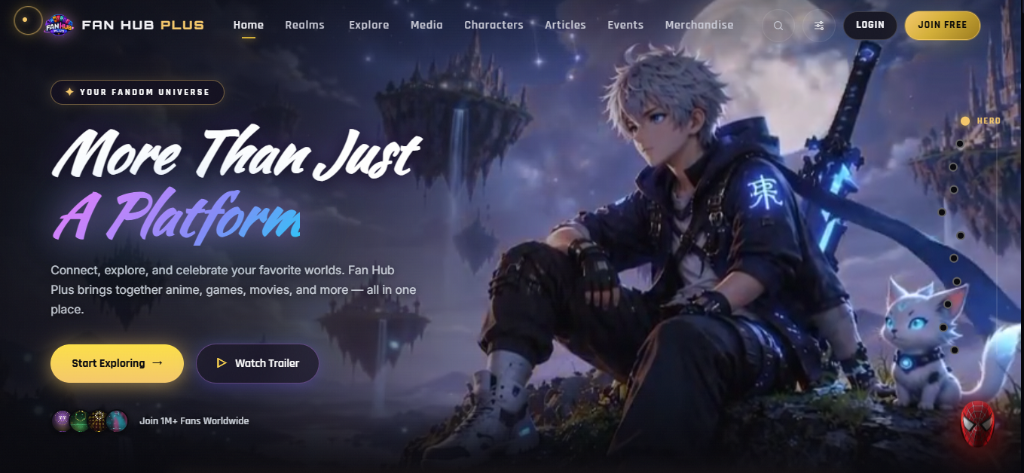
Loading Live Interactive App (Desktop)…
https://fan-hub-plus.runasp.net/
Project Type
Live Deployed Web Application
My Role
Full-Stack .NET & Angular Developer
Year Built
2025
Tech Stack Used
Why This Project Was Needed
Fans usually have to jump between wikis, event pages, and merch stores across different sites just to follow one series.
Architecture, API & Database Implementation
FanHub Plus puts fandom realms, character profiles, media galleries, articles, events, and merchandise inside one site. It runs on a C# / ASP.NET Core API with SQL Server and an Angular + Three.js frontend.
- ASP.NET Core REST endpoints for Realms, Characters, Media, Articles, Events, and Merchandise
- SQL Server tables linking characters, media items, and articles to each fandom realm
- Angular views with login/sign-up forms and reusable card filters
- Three.js 3D scene hooked into Angular lifecycle methods so it cleans up when changing routes
What Was Hard & How I Solved It
Challenge: Navigating away from the 3D scene left WebGL contexts running and slowed down the browser.
Solution: I added cleanup inside Angular ngOnDestroy to stop animation frames and dispose geometries, materials, and renderers.
Challenge: Six separate sections (Realms, Media, Characters, Articles, Events, Merch) started duplicating component logic.
Solution: I matched consistent DTO shapes in ASP.NET Core with shared Angular card and filter components.
Key Features Shipped
- Six connected sections: Realms, Media, Characters, Articles, Events, and Merch
- ASP.NET Core backend with SQL Server storage and user accounts
- Three.js 3D canvas managed cleanly inside Angular component hooks
Next Case Study